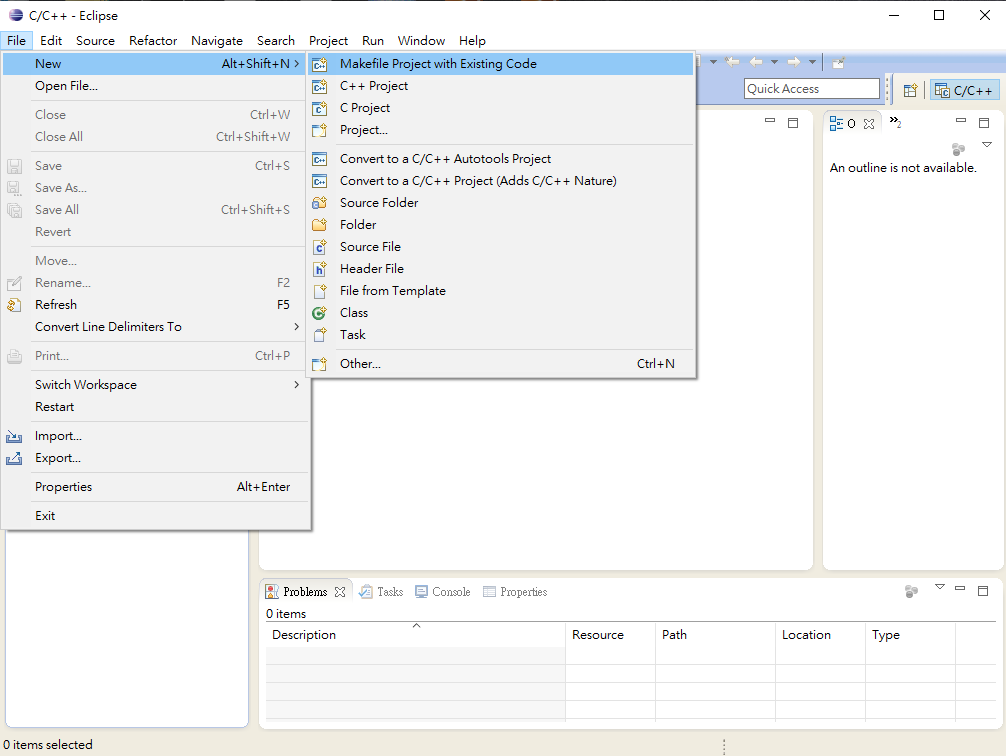
File-->New-->C Project
Create top-level folder要勾選
Window-->Preferences-->General-->Editors-->File Associations, 增加Makefile file associations
加入Linux source code 並設定icludes目錄並將設定做 export XML(Autoconf_symbol.xml)
cat autoconf.h |grep define |awk '{print "<macro><name>" $2 "</name><value>" $3 "</value></macro>"}' > autoconfl.xml
peter27863043 發表在
痞客邦
留言(0)
人氣()
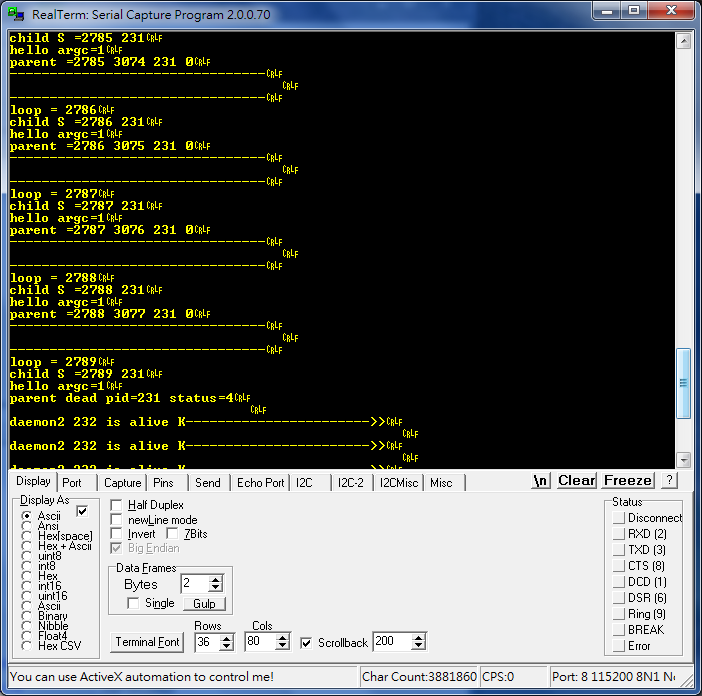
使用 daemon1 & daemons2 測試! daemon1 fork 出child process 而使用execv執行hello列印出簡單message.執行一段時間後daemon1被linux kernel kill!
trace:
src/linux/kernel/exit.c --> do_exit(long code) 加入debug message
printk(KERN_INFO "parent dead pid=%d status=%d\n",tsk->pid,code);
do_exit時code=4 --> SIGILL 非法指令
peter27863043 發表在
痞客邦
留言(0)
人氣()
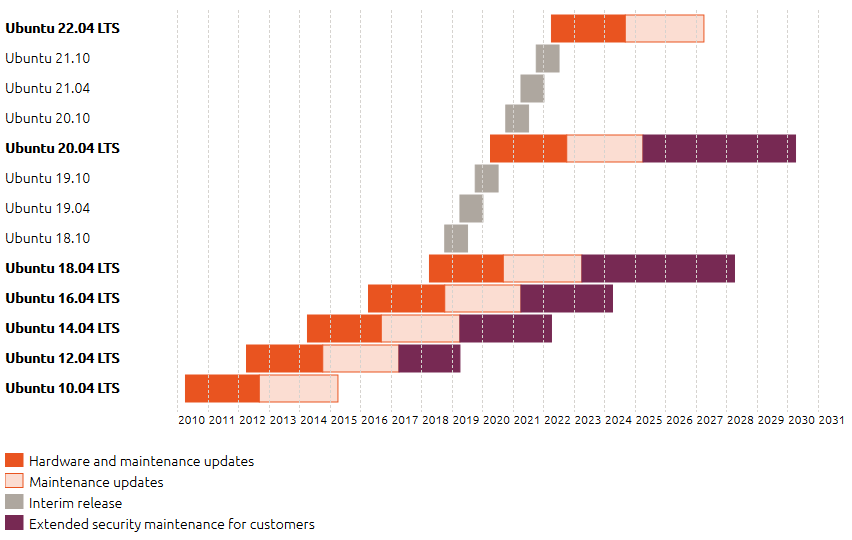
這次Build toolchian 要用ubuntu 16.04, 16.04 及之前版本的預設桌面為經典 Unity,18.04 開始為 Gnome 3,但您仍可手動安裝 Unity 並進行切換。
https://blog.xuite.net/yh96301/blog/242333268-%E5%AE%89%E8%A3%9DUbuntu+16.04
這次要在VirtualBox內在使用Docker, Docker 是屬於另外一種虛擬化技術,它透過 container 的方式將應用程式與相關所需的執行環境包起來,讓每個應用程式共用系統核心(kernel),但還是都有各自獨立的根目錄、檔案系統、網路環境、行程管理等,對於程式而言就好像在一般的獨立的系統上執行一樣。由於他很小執行速度較快可以在VM上很容易有好幾個Dcoker的Container
How To Install and Use Docker on Ubuntu 16.04'
查看 Docker 的版本資訊:
peter27863043 發表在
痞客邦
留言(0)
人氣()
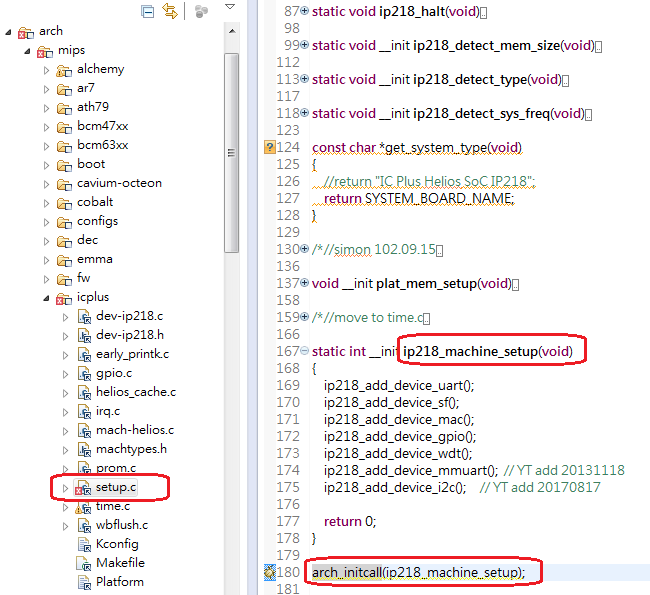
platform_device_register(): 註冊設備硬件,告訴kernel,當前有什麼設備
platform_driver_register(): 註冊設備的驅動程序
當個設備connect後
device和driver的兩條綫上都有匹配(由name來匹配)
匹配上(即binding),並且開始使用driver的probe等函數進行進行硬件初始化工作
peter27863043 發表在
痞客邦
留言(0)
人氣()
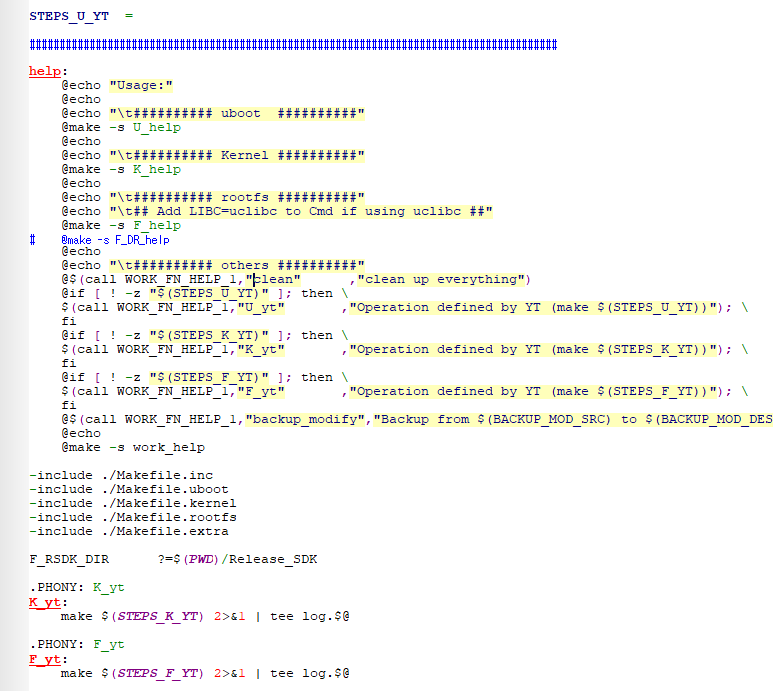
如果你在shell prompt只下make命令而已,第一個rule永遠被執行。 這叫default goal。如果你有指定target名字,例如make all,則會 去執行這個target的動作,此Makefile中會執行 help target 中的命令的
@make -s U_help "UBoot make target help"
@make -s K_help "Linux Kernel make target help"
@make -s F_help "Linux Fille System make target help"
make K_defc 會 test K_BUILD_DIR=(PWD)/build/linux是否存在有則移除,再make $(STEP_K_DEFC)的target=K_prepare K_reset K_defconfig K_build K_uimage K_upload
peter27863043 發表在
痞客邦
留言(0)
人氣()
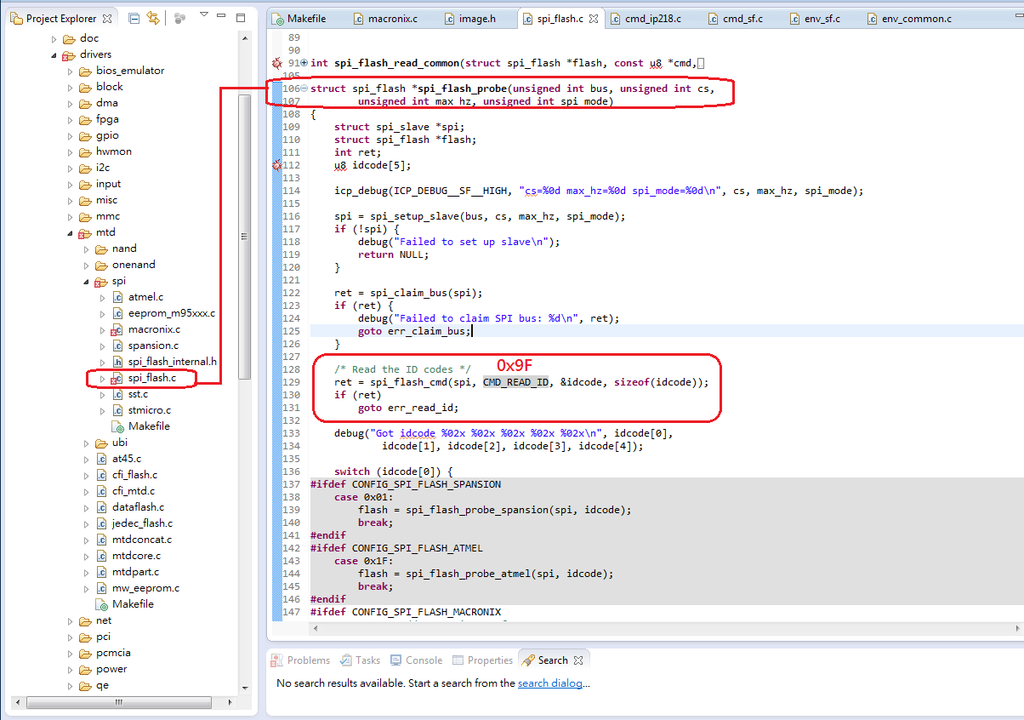
在uboot的spi_flash.c 中的spi_flash_probe中會下RDID/JEDEC ID RD的Command來Get Manufacture & Device ID
BH25Q128QAS 16MBytes 的SPI NOR Flash Sector = 4K-byte Block = 32/64K-byte,ID跟Winbond 25Q128只差一個Byte, Winbond 25Q128是"ef 40 18"
把BH25Q128QAS的Manufacture ID進去,為了簡單windbon & BoHong都用Macronix的檔案& Function
spi_flash_probe_macronix會到macrinix_spi_flash_table中去比較是否有一樣Device ID的資料,所以再把BH25Q128AS的資料加進去,UBoot這樣就OK了再來是Linux Kernel
Linux Kernel的dirver/mtd/device/m25p80.c 中的jedec_probe(struct spi_device *spi)會到 m25p_ids[]中check Manufacture & Device ID
peter27863043 發表在
痞客邦
留言(0)
人氣()
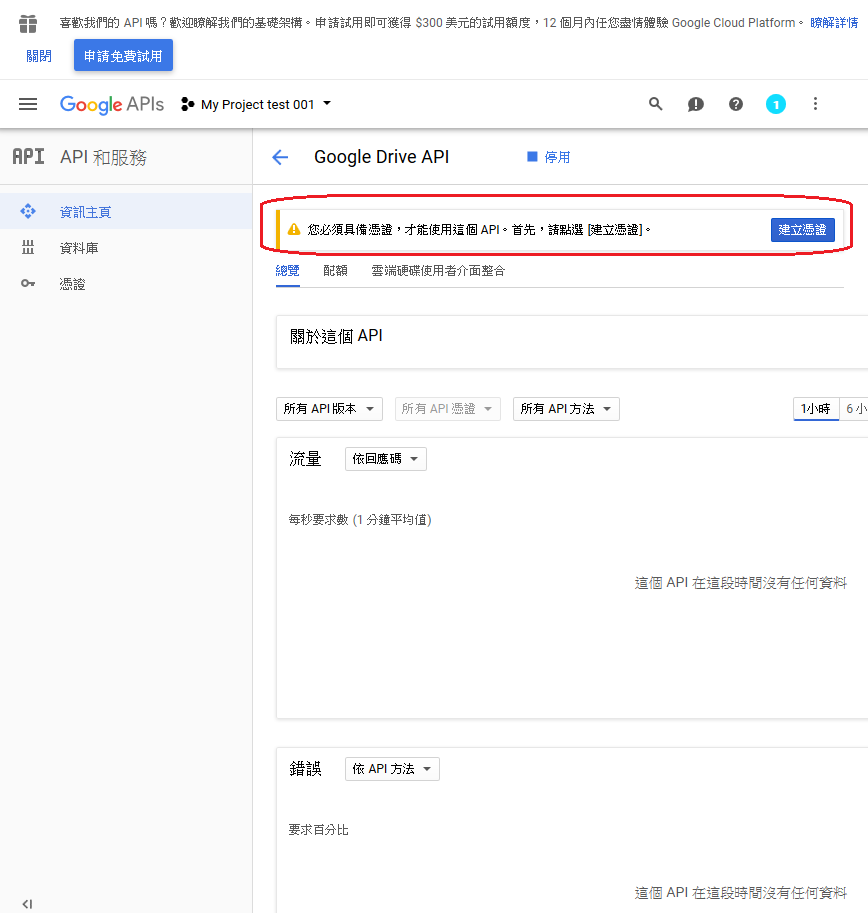
要先建立憑證給API程式,程式才能來存取Google Driver的東西
選擇Google Driv API憑證,因為我們是要存取Google Drive
選擇JSON型態的憑證檔案
將下載檔案存到等一下要執行python檔案的目錄
Google API 和服務可以看到所建的專案"My Project test 001"裡已有一個憑證
peter27863043 發表在
痞客邦
留言(0)
人氣()
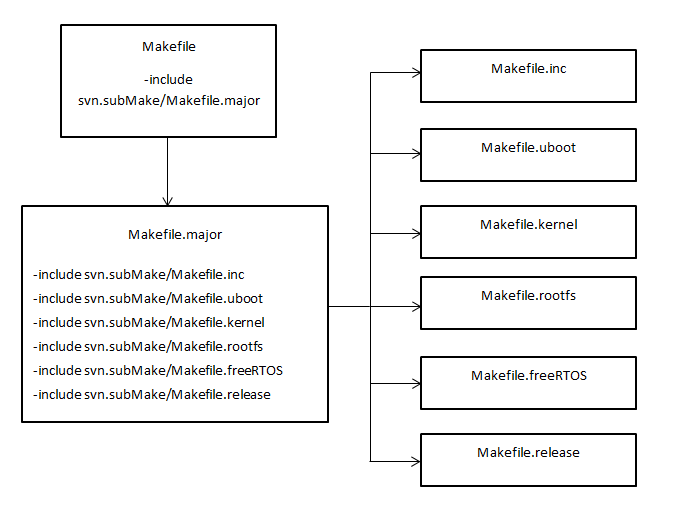
Makefile 將所需要的files include 進來
最上層的Makefile是svn.subMake/Makefile 的link
在svn.subMake/Makefile.kernel中定義了make kernel的各地target的prerequisites.在make過程中會把正確與錯誤資料通通寫入(overwrite)到同一個檔案$(LOG)
premake target是定義在Makefile.major中
在premake後真正要進入build linux kernel的是 _K_build,從這裡進入linux kernel的Makefile
peter27863043 發表在
痞客邦
留言(0)
人氣()
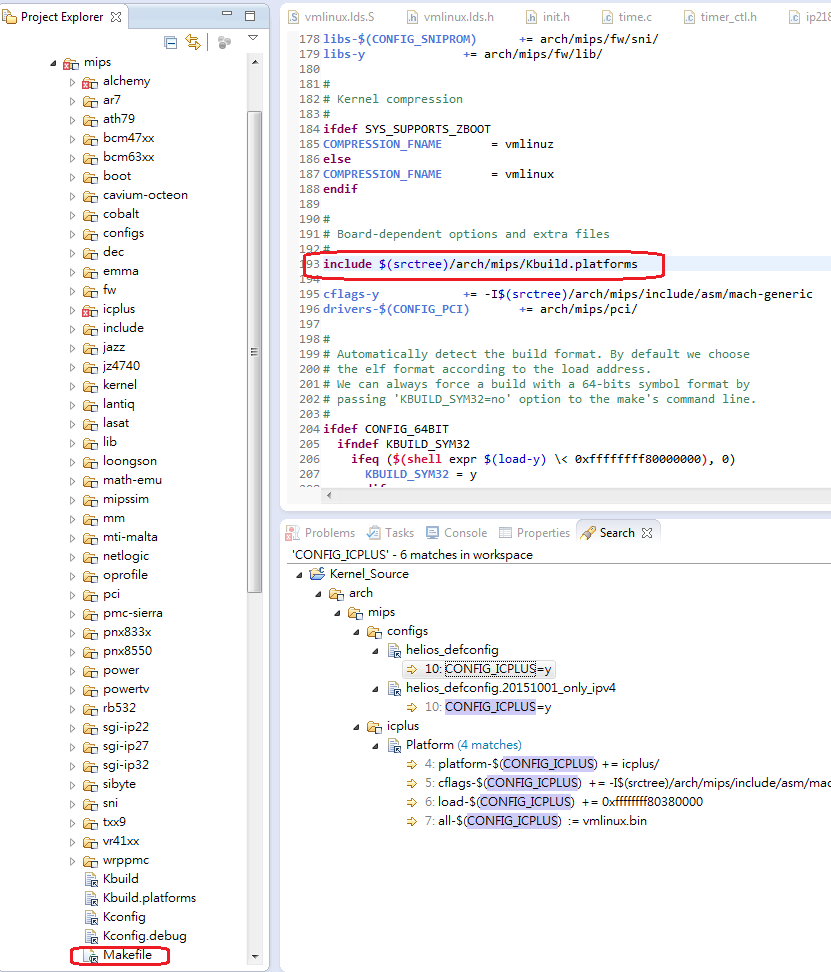
ARCH Makefile位於ARCH/$(ARCH)/Makefile,是系統對應平台的Makefile。Kernel Top Makefile會包含這個文件來指定平台相關信息。只有平台開發人員會關心這個文件。重點是Board-dependent options and extra files => #include $(srctree)/arch/mips/Kbuild.platforms
Kbuild.platforms(file following description)
platforms += icplus
# include the platform specific files
include $(patsubst %, $(srctree)/arch/mips/%/Platform, $(platforms))
peter27863043 發表在
痞客邦
留言(0)
人氣()
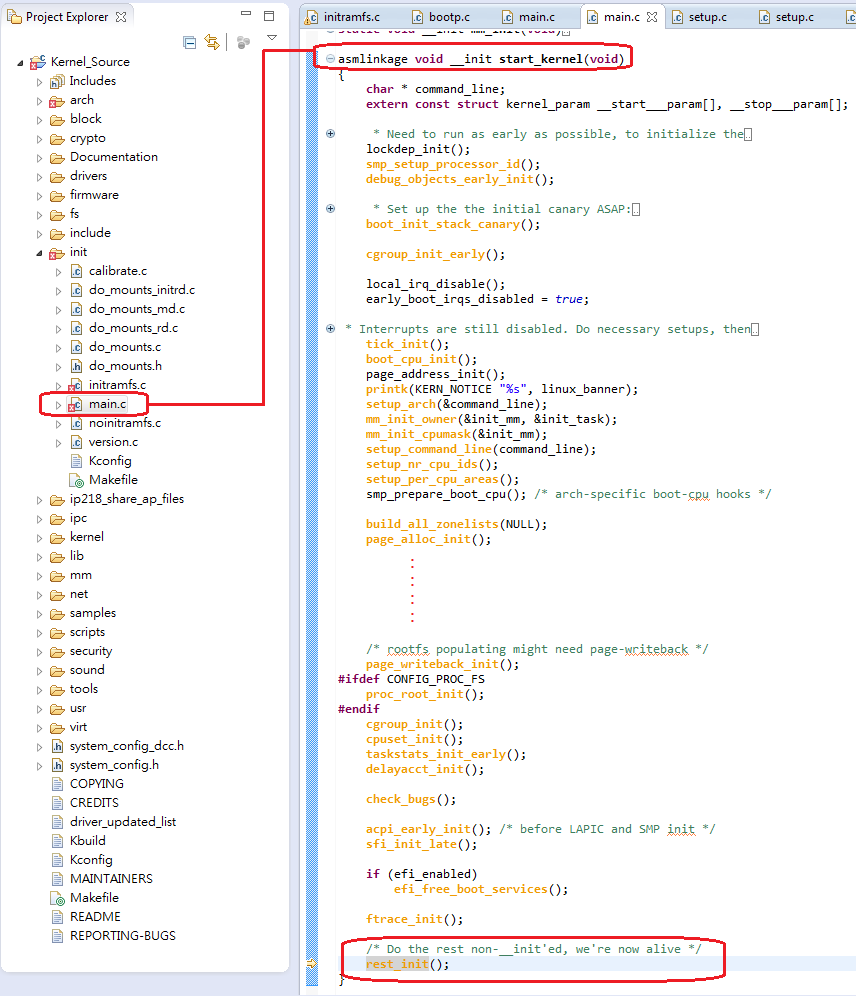
start_kernel() 是 Linux kernel "正式的"進入點,但是 start_kernel() 通常不是在核心被載入後就立刻被執行,在它開始執行之前還有些準備工作要先完成。 在核心被載入後,通常最開始被執行的是的放在 Linux kernel image 最開頭的 bootstrap code, 負責關閉中斷,記憶體設定等硬體初始化準備工作,甚至還包含將壓縮的內核解壓縮。 這些 bootstrap code 是屬於平台架構相依的,它通常是位於 arch/xxx/boot/ 之下的 assembly code (xxx 可以是 x86 或是 arm 等)。
reset_init() 會creat 一個kernel thread:kernel_init繼續其它的initialization
PID 1 的kernel thread: kernel_init()
Trace Kernel Startup原因是在Kernel Driver中加了一些Code後竟然發生Error而且Kernel Panic.仔細看是在unpack root file system到DDR中發生問題!
在做unpack_to_rootfs()時error, 加入一些pintk message 看看到底是甚麼問題!
peter27863043 發表在
痞客邦
留言(0)
人氣()

安裝pymodbus3 來做Modbus,他Support TCP/UDP/Serial ,RTU/ASCII ,Master/Slave
不知為何無法正確安裝相關的的package "incremental",
先單獨安裝incremental, pip3 install -U incremental
再重新安裝pymodbus3, pip3 install -U pymodbus3 結果發現要先安裝Visual C++ 14.0 的build Tools
安裝Visual C++ Build Tools
peter27863043 發表在
痞客邦
留言(0)
人氣()

安裝windows版的python到我的VirtualBox上WIN7,到 https://www.python.org/ 下載
Download excutable Installer版本,要32/64bit就看你的作業系統了!
試了很久才發現pip雖然3.4就預載但不能直接用,原來還要Bootstrapping pip 參考下面網址 https://docs.python.org/3/library/ensurepip.html
執行python -m ensurepip
執行Python的Module Docs可以查看目前的 Modules
peter27863043 發表在
痞客邦
留言(0)
人氣()
